How do I enable Force Feedback on my promo campaigns as default?
Force feedback is a feature of the promo system where by promo recipients / djs must submit feedback before they can download your music.
As default you need to enable this for each campaign as you send them out.
It is possible to enable this as default for all campaigns so you do not need to remember to do this each time.
Complete these steps -
1. Select "Settings" on the top menu
2. Select the "Promotion Settings" tab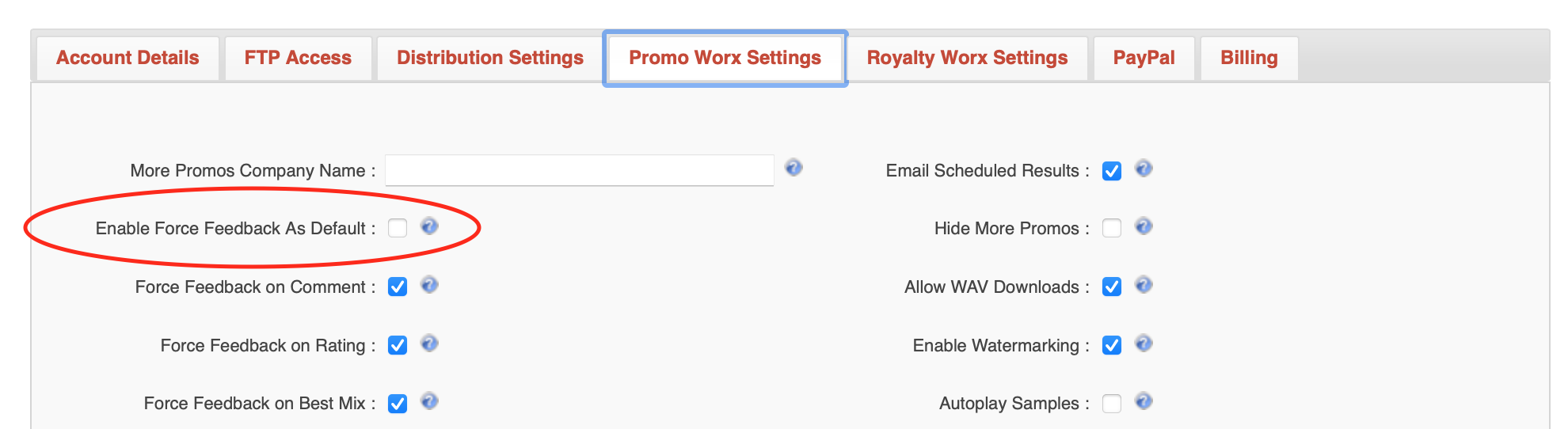
3. Tick the checkbox "Enable Force Feedback As Default"
Optionally untick or tick the following checkboxes depending on what you want to "Force" the recipients to reply with
a. "Force Feedback on Comment"
b. "Force Feedback on Rating"
c. "Force Feedback on Best Mix"
4. Click the "Apply" on the icon menu
Note - Updating this setting will NOT update the Force Feedback settings on all existing campaigns. These settings will only apply to new campaigns that you create and send out to DJ's